Virtual Network Design
VNet design is one of the first conversations in any Azure engagement. The decisions — address space, subnet structure, peering topology — are made before most workloads exist, which means they have to account for what's coming. I've inherited environments with 192.168.x.x address spaces assigned to Azure VNets, which instantly clashes with VPN clients on the same subnet. Getting this right takes 30 minutes. Fixing it later takes weeks.
Address space planning
Step 1: IP Address Planning
The non-negotiables I start with:
- Avoid overlaps with on-premises and other Azure networks
- Plan for growth (allocate larger ranges than current needs)
- Use RFC 1918 private IP ranges
- Document all allocations
Recommended Allocation Strategy:
Corporate IP Space: 10.0.0.0/8
  ├── Production:    10.0.0.0/12  (10.0.0.0 - 10.15.255.255)
  ├── Development:   10.16.0.0/12 (10.16.0.0 - 10.31.255.255)
  ├── Testing:       10.32.0.0/12 (10.32.0.0 - 10.47.255.255)
  └── Sandbox:       10.48.0.0/12 (10.48.0.0 - 10.63.255.255)

Region: East US Production
  └── Hub VNet:      10.0.0.0/16
  └── Spoke 1 (App1): 10.1.0.0/16
  └── Spoke 2 (App2): 10.2.0.0/16
Step 2: VNet and Subnet Sizing
VNet Size Recommendations:
| Environment | VNet Size | Usable IPs | Use Case |
|---|---|---|---|
| Large Enterprise Hub | /16 | ~65,000 | Centralized services |
| Application Spoke | /16 | ~65,000 | Multi-tier app |
| Small Workload | /20 | ~4,000 | Single app, few resources |
| Development | /20 | ~4,000 | Dev/test environments |
Subnet Size Recommendations:
| Purpose | Size | Usable IPs | Notes |
|---|---|---|---|
| AzureFirewallSubnet | /26 | 59 | Minimum /26 required |
| GatewaySubnet | /27 | 27 | Minimum /27, /26 recommended |
| AzureBastionSubnet | /26 | 59 | Minimum /26 required |
| AKS Node Pool | /22 - /20 | 1,019 - 4,091 | Depends on pod count |
| Web Tier | /24 | 251 | 10-100 VMs |
| App Tier | /24 | 251 | 10-100 VMs |
| Data Tier | /25 | 123 | 5-50 databases |
| Management | /27 | 27 | Jump boxes, monitoring |
Azure Reserved IPs per Subnet:
.0- Network address.1- Default gateway (Azure).2- Azure DNS mapping.3- Azure reserved.255- Broadcast address (last IP)
Example: Subnet 10.1.1.0/24 has 251 usable IPs (10.1.1.4 - 10.1.1.254)
Step 3: Subnet Design Patterns
Three-Tier Application
VNet: 10.1.0.0/16 (vnet-app-prod-eastus)
  ├── snet-web:        10.1.1.0/24  (Web/Frontend)
  ├── snet-app:        10.1.2.0/24  (Application Logic)
  ├── snet-data:       10.1.3.0/24  (Databases)
  ├── snet-integration:10.1.4.0/24  (App Service VNet Integration)
  └── snet-privatelink:10.1.5.0/24  (Private Endpoints)
Hub VNet Structure
Hub VNet: 10.0.0.0/16 (vnet-hub-prod-eastus)
  ├── AzureFirewallSubnet:    10.0.0.0/26   (Firewall)
  ├── GatewaySubnet:          10.0.1.0/27   (VPN/ExpressRoute)
  ├── AzureBastionSubnet:     10.0.2.0/26   (Bastion)
  ├── snet-management:        10.0.3.0/24   (Jump boxes)
  └── snet-shared-services:   10.0.4.0/24   (DNS, monitoring)
Step 4: VNet Peering Design
Hub-Spoke Topology (Recommended):
        Hub VNet (10.0.0.0/16)
           /    |    \
          /     |     \
         /      |      \
    Spoke 1  Spoke 2  Spoke 3
  (10.1.0.0/16)(10.2.0.0/16)(10.3.0.0/16)
Peering Options:
AllowVirtualNetworkAccess: Enable communicationAllowForwardedTraffic: Allow traffic from other networksAllowGatewayTransit: Share VPN/ExpressRoute (Hub only)UseRemoteGateways: Use hub's gateway (Spokes only)
No Transitive Routing: Spokes cannot communicate directly. Traffic must route through hub (Azure Firewall or NVA).
Terraform Example
# Variables for IP planning
variable "hub_vnet_cidr" {
  default = "10.0.0.0/16"
}

variable "spoke_prod_cidr" {
  default = "10.1.0.0/16"
}

# Hub VNet
resource "azurerm_virtual_network" "hub" {
  name                = "vnet-hub-prod-${var.region}"
  resource_group_name = azurerm_resource_group.hub.name
  location            = var.region
  address_space       = [var.hub_vnet_cidr]

  dns_servers = ["10.0.4.4", "10.0.4.5"]  # Custom DNS if needed

  tags = {
    Environment = "Production"
    Purpose     = "Hub"
    CostCenter  = "IT-Network"
  }
}

# Hub Subnets
resource "azurerm_subnet" "firewall" {
  name                 = "AzureFirewallSubnet"  # Name is mandatory
  resource_group_name  = azurerm_resource_group.hub.name
  virtual_network_name = azurerm_virtual_network.hub.name
  address_prefixes     = ["10.0.0.0/26"]
}

resource "azurerm_subnet" "gateway" {
  name                 = "GatewaySubnet"  # Name is mandatory
  resource_group_name  = azurerm_resource_group.hub.name
  virtual_network_name = azurerm_virtual_network.hub.name
  address_prefixes     = ["10.0.1.0/27"]
}

resource "azurerm_subnet" "bastion" {
  name                 = "AzureBastionSubnet"  # Name is mandatory
  resource_group_name  = azurerm_resource_group.hub.name
  virtual_network_name = azurerm_virtual_network.hub.name
  address_prefixes     = ["10.0.2.0/26"]
}

# Spoke VNet
resource "azurerm_virtual_network" "spoke_prod" {
  name                = "vnet-spoke-prod-${var.region}"
  resource_group_name = azurerm_resource_group.spoke.name
  location            = var.region
  address_space       = [var.spoke_prod_cidr]

  tags = {
    Environment = "Production"
    Purpose     = "Application Workloads"
    Application = "MyApp"
  }
}

# Application Tier Subnets
locals {
  spoke_subnets = {
    web = {
      name   = "snet-web"
      prefix = "10.1.1.0/24"
    }
    app = {
      name   = "snet-app"
      prefix = "10.1.2.0/24"
    }
    data = {
      name   = "snet-data"
      prefix = "10.1.3.0/24"
      # Disable service endpoints for data tier
      service_endpoints = ["Microsoft.Sql", "Microsoft.Storage"]
    }
  }
}

resource "azurerm_subnet" "spoke" {
  for_each = local.spoke_subnets

  name                 = each.value.name
  resource_group_name  = azurerm_resource_group.spoke.name
  virtual_network_name = azurerm_virtual_network.spoke_prod.name
  address_prefixes     = [each.value.prefix]

  service_endpoints = lookup(each.value, "service_endpoints", [])
}

# VNet Peering: Hub to Spoke
resource "azurerm_virtual_network_peering" "hub_to_spoke_prod" {
  name                      = "peer-hub-to-spoke-prod"
  resource_group_name       = azurerm_resource_group.hub.name
  virtual_network_name      = azurerm_virtual_network.hub.name
  remote_virtual_network_id = azurerm_virtual_network.spoke_prod.id

  allow_virtual_network_access = true
  allow_forwarded_traffic      = true
  allow_gateway_transit        = true  # Hub shares gateway
  use_remote_gateways          = false
}

# VNet Peering: Spoke to Hub
resource "azurerm_virtual_network_peering" "spoke_prod_to_hub" {
  name                      = "peer-spoke-prod-to-hub"
  resource_group_name       = azurerm_resource_group.spoke.name
  virtual_network_name      = azurerm_virtual_network.spoke_prod.name
  remote_virtual_network_id = azurerm_virtual_network.hub.id

  allow_virtual_network_access = true
  allow_forwarded_traffic      = true
  allow_gateway_transit        = false
  use_remote_gateways          = false  # Set true after gateway exists

  depends_on = [
    azurerm_virtual_network_peering.hub_to_spoke_prod
  ]
}

# User Defined Route (Force traffic through Firewall)
resource "azurerm_route_table" "spoke" {
  name                          = "rt-spoke-prod"
  resource_group_name           = azurerm_resource_group.spoke.name
  location                      = var.region
  disable_bgp_route_propagation = false

  route {
    name                   = "to-internet-via-firewall"
    address_prefix         = "0.0.0.0/0"
    next_hop_type          = "VirtualAppliance"
    next_hop_in_ip_address = azurerm_firewall.hub.ip_configuration[0].private_ip_address
  }

  route {
    name           = "to-onprem-via-firewall"
    address_prefix = "192.168.0.0/16"  # On-prem CIDR
    next_hop_type  = "VirtualAppliance"
    next_hop_in_ip_address = azurerm_firewall.hub.ip_configuration[0].private_ip_address
  }
}

# Associate Route Table to Subnets
resource "azurerm_subnet_route_table_association" "spoke" {
  for_each = azurerm_subnet.spoke

  subnet_id      = each.value.id
  route_table_id = azurerm_route_table.spoke.id
}
BGP propagation and NVA routing
When I route 0.0.0.0/0 to an NVA (FortiGate, Azure Firewall, etc.) and disable BGP route propagation on the route table, every route to spokes, internet, and Azure services must be manually configured. This gives total control over traffic -- nothing flows unless I've explicitly allowed it -- but it makes network rule management significantly harder as the environment grows.
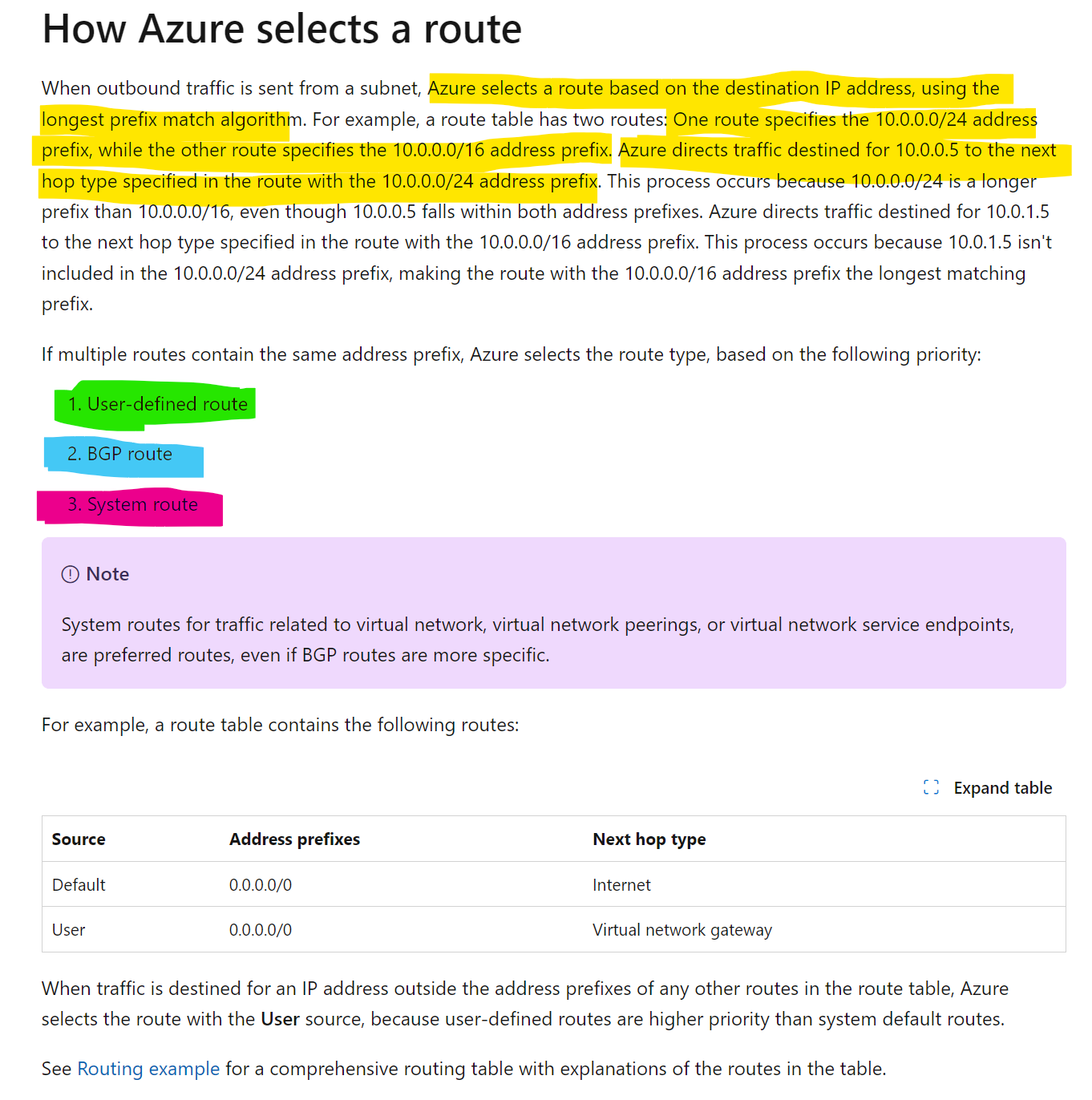

I've used this pattern in environments where the security team wants zero implicit connectivity. It works, but the operational cost is real -- every new spoke, every new PaaS service that needs a service tag route, every Azure service that needs a management endpoint becomes a manual route table entry. I prefer keeping BGP propagation enabled and controlling traffic at the firewall/NVA policy layer instead.
Best Practices
IP Address Planning
✅ Do:
- Use /16 for VNets to allow for growth
- Document IP allocations in a central spreadsheet
- Reserve IP ranges for future regions and environments
- Use consistent CIDR allocation across environments
- Test for overlaps before deployment
❌ Avoid:
- Overlapping IP ranges with on-premises
- Using public IP ranges for private networks
- Allocating too small subnets that can't grow
- I avoid 192.168.x.x because it clashes with most home networks and VPN clients
Subnet Design
✅ Do:
- Create separate subnets for each tier (web, app, data)
- Use /24 or larger for application subnets
- Plan for at least 2x current capacity
- Use descriptive naming (snet-web, snet-app, snet-data)
- Apply NSGs to every subnet
❌ Avoid:
- Putting all resources in one subnet
- Using /29 or smaller (too few IPs, only 3 usable)
- Mixing security zones in same subnet
- Creating too many tiny subnets (management overhead)
VNet Peering
✅ Do:
- Use hub-spoke for enterprise deployments
- Enable forwarded traffic in hub
- Document peering relationships
- Use resource locks on peering connections
❌ Avoid:
- Creating spoke-to-spoke peerings (use hub routing)
- Full mesh peering (doesn't scale, use Virtual WAN)
- Forgetting bidirectional peering requirements
- Deleting peerings without impact analysis
Routing
✅ Do:
- Force tunnel traffic through Azure Firewall in hub
- Use User Defined Routes (UDR) for traffic control
- Document routing decisions
- Test failover scenarios
❌ Avoid:
- Allowing direct internet access from data tier
- Creating routing loops
- Bypassing security controls with 0.0.0.0/0 to Internet
Things to Avoid
❌ Don't change VNet address space after deployment (breaks resources) ❌ Don't create VNets without planning for hybrid connectivity ❌ Don't use overlapping CIDRs across environments ❌ Don't deploy production without route tables ❌ Don't mix environments (prod/dev) in same VNet ❌ Don't create more than 500 peerings per VNet ❌ Don't use default names (vnet1, subnet1) ❌ Don't skip DNS planning (use Private DNS Zones) ❌ Don't forget to enable DDoS Protection on production VNets
CIDR Calculation Reference
| CIDR | Subnet Mask | Total IPs | Usable IPs (Azure) | Use Case |
|---|---|---|---|---|
| /16 | 255.255.0.0 | 65,536 | ~65,000 | Large VNet |
| /20 | 255.255.240.0 | 4,096 | ~4,000 | Medium VNet |
| /22 | 255.255.252.0 | 1,024 | ~1,000 | AKS nodes |
| /24 | 255.255.255.0 | 256 | 251 | Standard subnet |
| /25 | 255.255.255.128 | 128 | 123 | Small subnet |
| /26 | 255.255.255.192 | 64 | 59 | Firewall/Bastion |
| /27 | 255.255.255.224 | 32 | 27 | Gateway subnet |
| /28 | 255.255.255.240 | 16 | 11 | Very small |
| /29 | 255.255.255.248 | 8 | 3 | Not recommended |
Advanced Scenarios
Multi-Region Hub-Spoke
East US Hub (10.0.0.0/16) <--Global VNet Peering--> West US Hub (10.10.0.0/16)
    |                                                      |
    +-- Spoke 1 (10.1.0.0/16)                            +-- Spoke 4 (10.11.0.0/16)
    +-- Spoke 2 (10.2.0.0/16)                            +-- Spoke 5 (10.12.0.0/16)
    +-- Spoke 3 (10.3.0.0/16)
Global VNet Peering Considerations:
- Cross-region bandwidth charges apply
- Latency depends on region distance
- Use for disaster recovery and geo-distribution
Azure Virtual WAN (For Very Large Deployments)
Consider Virtual WAN when:
- 50+ branch locations
- Multiple Azure regions
- Need managed routing
- SD-WAN integration
Monitoring & Troubleshooting
Verify VNet Configuration
# List all VNets
az network vnet list -o table

# Show VNet details
az network vnet show \
  --resource-group rg-network \
  --name vnet-hub-prod-eastus

# List subnets
az network vnet subnet list \
  --resource-group rg-network \
  --vnet-name vnet-hub-prod-eastus \
  -o table

# Check peering status
az network vnet peering list \
  --resource-group rg-network \
  --vnet-name vnet-hub-prod-eastus \
  -o table
Check Effective Routes
# See routes for a specific NIC
az network nic show-effective-route-table \
  --resource-group rg-app \
  --name nic-vm-web-01 \
  -o table