About the Copilot prompt stack
The thing that changed how I use GitHub Copilot wasn't learning to write better prompts. It was understanding that the LLM's behavior is shaped long before I type anything into the chat. By default, Copilot uses a built-in system prompt that's generic enough to work for everyone, which means it's not optimized for anyone. That built-in instruction set doesn't know my team's conventions, my preferred tooling, or the patterns I've standardized across repositories.
Over the past year, GitHub has shipped a series of features that let me layer my own context on top of that default system prompt. I think of it as an architecture with three layers, and the order I set them up matters.
Understanding the prompt stack
Before diving into the customization features, it helps to see what's actually happening under the hood. When I type a message in Copilot, the model doesn't just see my text. It sees a full prompt stack built from multiple layers. Most of these are built-in and not user-editable. The three I can control are custom instructions, custom agents, and prompt files, and where each one gets injected in the stack determines what it's good for.
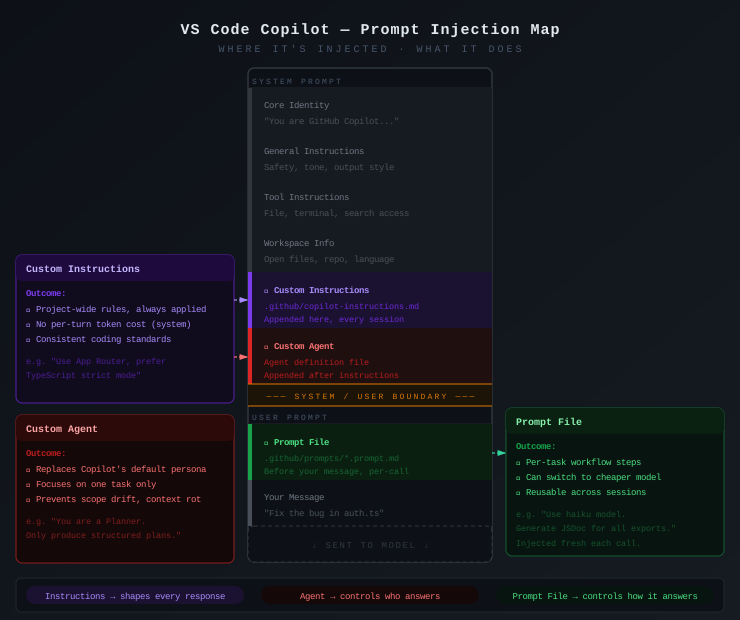
The bottom strip of the diagram captures the mental model I keep coming back to:
- Custom instructions shape every response. They're appended to the end of the system prompt, so they refine the built-in behavior persistently without fighting it. Project-wide rules, coding standards, framework preferences live here.
- Custom agents control who answers. They're injected after custom instructions and can override Copilot's default persona entirely. A "Planner" agent that only produces structured plans, an "Implementer" that only writes code: this is how I prevent scope drift in long sessions.
- Prompt files control how it answers. They land at the start of the user prompt, before my actual message. Fresh each invocation, they can specify a different model for cost savings and inject task-specific workflow steps.
The system prompt / user prompt boundary is the key architectural insight. Everything above the line persists across turns in a conversation. Everything below it gets sent fresh. That's why custom instructions are great for persistent conventions (always in context) while prompt files are great for per-task workflows (no stale context accumulation).
The built-in layers (core identity, general instructions, tool instructions, workspace info) are doing useful work. I don't want to replace them, I want to augment them with my project-specific context.
The three interaction modes
Before getting into customization, it's worth noting that Copilot in VS Code operates in three distinct modes. Each one changes what the LLM can do:
Agent mode. This is the one I use most. The LLM can read files, run terminal commands, make edits, and iterate on its own work. It picks up the built-in system prompt plus any custom instructions I've configured. When I say "fix the failing test," it will actually go find the test, read the error, edit the code, and re-run it.
Ask mode. A simpler conversational mode. The LLM answers questions based on the context I provide but doesn't take actions. I use this when I want to understand something without Copilot modifying files: "explain what this KQL query does" or "what's the difference between these two Terraform resource types."
Edit mode. Focused on inline code changes. I select code, describe what I want changed, and Copilot proposes edits. Good for targeted refactoring where I don't need the full agent loop.
The customization features I'm about to cover primarily affect agent mode, since that's where the system prompt and tool-use behavior matter most. Ask mode also picks up custom instructions for context, but it doesn't invoke skills or agents.
The architecture: three layers of customization
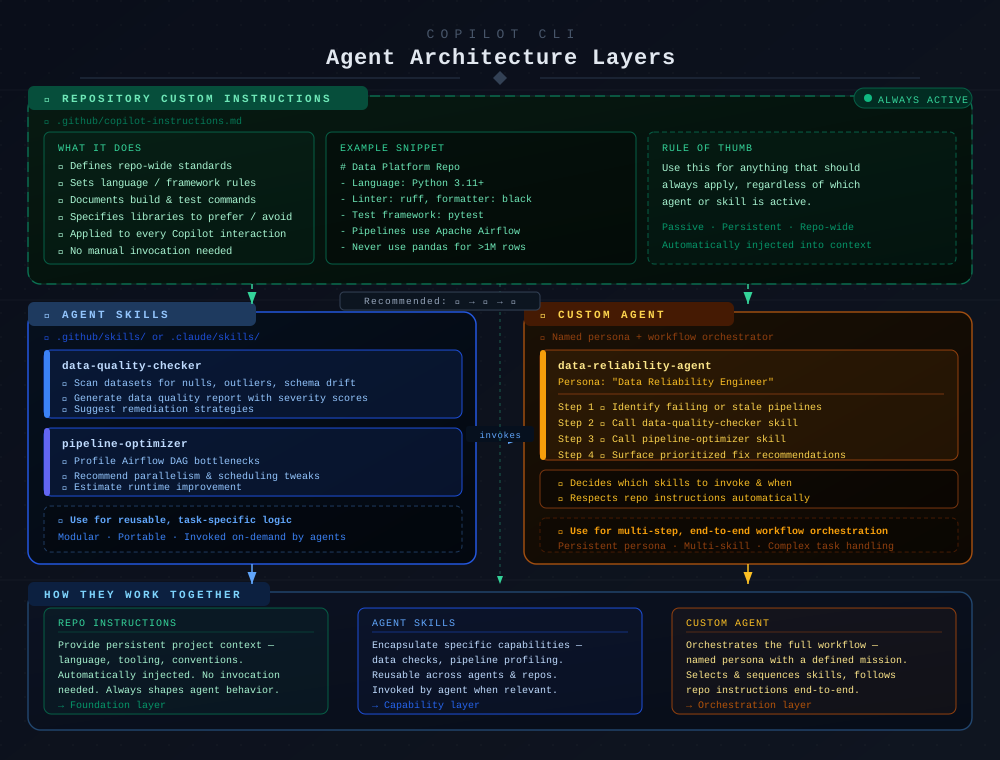
The diagram below shows how the three customization layers relate to each other. I recommend building them in order: start with repository instructions, add skills when you have reusable task-specific logic, and create custom agents when you need multi-step workflow orchestration.
Layer 1: Repository custom instructions (always active)
This is the foundation, and honestly, if you do nothing else from this page, do this one. A file at .github/copilot-instructions.md in your repository gets automatically injected into every Copilot interaction: agent mode, ask mode, all of it. No invocation needed, no special syntax. It just becomes part of the context window, every time.
I use this to encode the things I'd otherwise repeat in every prompt:
# Platform Infrastructure Repo

## Language and tooling
- All infrastructure is Terraform (1.6+) with AzureRM provider
- Use `ruff` for Python linting, `black` for formatting
- Test framework: `pytest` with `pytest-terraform`
- CI/CD: GitHub Actions. Never suggest Azure DevOps pipelines

## Conventions
- Module structure follows the standard: main.tf, variables.tf, outputs.tf, versions.tf
- All resources must have a `tags` block referencing var.common_tags
- Never hardcode subscription IDs or tenant IDs
- Use data sources to look up existing resources, don't assume resource IDs

## Build and test
- Run `terraform fmt -check` and `terraform validate` before any plan
- Python tests: `python -m pytest tests/ -v`
- Integration tests require `az login` first
What makes a good instructions file
The mistake I made early on was writing instructions that were too vague, like "follow best practices" or "write clean code." That's useless because the LLM already tries to do that. The instructions that actually change behavior are specific and concrete:
- Name the exact tools, versions, and frameworks
- State what to avoid, not just what to prefer
- Include actual commands people run
- Reference your repo's real directory structure
- Be opinionated. "Never use X" is more useful than "prefer Y"
What doesn't belong here
Repository instructions should be things that are always true for this repo. If something only matters for specific tasks, it belongs in a skill or agent definition instead. I've seen people stuff entire style guides in here, which bloats the context window and pushes out the actual working context the LLM needs.
Keep it under 100 lines. Be ruthless about what earns a spot.
Layer 2: Agent skills (reusable capabilities)
Skills are where things get interesting. A skill is a markdown file that teaches Copilot how to perform a specific task. Not just "what to do" but the step-by-step procedure, which tools to use, what output to produce, and what edge cases to handle.
Skills live in .github/skills/ (or .vscode/skills/ depending on your setup) and are invoked on demand, either explicitly by a custom agent or automatically when Copilot determines a skill is relevant to the current task.
Here's a real skill I use for reviewing Terraform modules:
# Terraform Module Review

## When to use
When asked to review a Terraform module, or when changes are made to .tf files.

## Procedure
1. Check that all variables have descriptions and type constraints
2. Verify outputs match what consumers of the module actually need
3. Ensure provider version constraints are set (not floating)
4. Look for hardcoded values that should be variables
5. Verify lifecycle rules are set appropriately (prevent_destroy on stateful resources)
6. Check that resource names follow the pattern: {project}-{env}-{resource_type}-{purpose}

## Common issues I always check for
- Missing `tags` block (every resource needs var.common_tags)
- Using `count` where `for_each` would be more maintainable
- Data sources without error handling (what if the resource doesn't exist yet?)
- Outputs that expose sensitive values without `sensitive = true`

## Output format
Produce a numbered list of findings, each with:
- Severity: critical / warning / suggestion
- File and line reference
- What's wrong and why it matters
- Specific fix (show the corrected code)
Why skills beat long prompts
Before skills existed, I'd copy-paste the same review checklist into the chat every time. That's three problems: it wastes context window, it's inconsistent (I'd forget items), and it's not version-controlled. Skills solve all three. They're files in the repo, so they get reviewed in PRs, they're consistent every time, and they don't eat into my prompt space because they're loaded only when relevant.
Skill design principles I've landed on
- One skill, one job. A skill that tries to do data validation AND pipeline optimization AND alerting is too broad. Split them.
- Include the "when to use" section. This helps Copilot (and custom agents) know when to invoke the skill automatically.
- Be procedural, not declarative. "Check for X, then do Y, then produce Z" works better than "ensure good quality."
- Include output format expectations. If I want a severity-scored list, I say so. Otherwise the LLM picks a random format every time.
Layer 3: Custom agents (workflow orchestration)
Custom agents are the top of the stack. An agent is essentially a persona with a mission. It has a name, a description of when it should be activated, and a set of instructions that define its workflow. Critically, an agent can invoke skills, which is what makes the layered architecture work.
I have a custom agent for my most common end-to-end workflow, reviewing infrastructure changes before they go to production:
# Infrastructure Review Agent

## Persona
You are a senior platform engineer reviewing infrastructure changes.
Your job is to catch issues before they reach production.

## When to activate
When the user asks to review infrastructure, Terraform, or IaC changes.

## Workflow
1. Identify all changed .tf files in the current branch
2. For each changed module, invoke the `terraform-module-review` skill
3. Check if any changed resources affect networking or identity
   - If networking: verify no public endpoints are exposed without justification
   - If identity: verify least-privilege principle is maintained
4. Look for missing or outdated tests for changed modules
5. Produce a consolidated review with:
   - A summary table of findings by severity
   - Detailed findings for each module
   - A "ready to merge" / "needs changes" recommendation

## Constraints
- Always respect the repository custom instructions
- Never suggest changes that would break existing Terraform state
- If unsure about blast radius, flag it rather than guessing
When I reach for a custom agent instead of a skill
The decision is straightforward: if the task is a single, well-defined operation (review this file, check this config, format this output), it's a skill. If the task involves deciding what to do, sequencing multiple operations, and synthesizing results, it's an agent.
An agent is the thing that says "first I need to check which files changed, then for each one I need to run the review skill, then I need to cross-reference against the networking policy." A skill is the thing that actually runs the review on a single file.
How the layers compose
This is the part that took me a while to get right. The three layers aren't alternatives. They are additive:
| Layer | Scope | Activation | Purpose |
|---|---|---|---|
| Repository instructions | Entire repo | Automatic, always | Foundation: conventions, tooling, constraints |
| Agent skills | Task-specific | On demand or auto-detected | Capabilities: how to perform specific tasks |
| Custom agents | Workflow-level | User-invoked or triggered | Orchestration: sequencing skills into workflows |
When I invoke my infra-reviewer agent:
- The repository instructions are loaded first, so the agent knows we use Terraform, our naming conventions, our tag requirements
- The agent follows its workflow steps, which include invoking the terraform-module-review skill
- The skill runs with the full context of both the repo instructions and the agent's current state
This composition is why the layered approach works. I don't duplicate my Terraform conventions in every skill and every agent. I write them once in the repo instructions, and everything downstream inherits them.
Things I've gotten wrong
Putting too much in repo instructions. My first version was 300 lines. The context window isn't infinite, and I was crowding out the actual code context Copilot needed to do its job. I cut it to under 100 lines and the quality of responses improved noticeably.
Writing skills that were too vague. "Review this code for quality" produces generic output. "Check for these 6 specific things and produce a severity-scored list" produces actionable output. The more procedural the skill, the better the results.
Not using the "when to use" section in skills. Without it, Copilot has to guess when a skill is relevant, and it guesses wrong often enough to be annoying. Explicit trigger conditions save time.
Trying to build agents before I had skills. An agent that doesn't invoke skills is just a long prompt with extra steps. The value of agents comes from composing skills, so build the skills first, then orchestrate them.
Getting started: the sequence I recommend
If you're starting from zero, here's the order I recommend:
-
Create
.github/copilot-instructions.mdwith your repo's language, tooling, conventions, and build commands. This alone will improve every Copilot interaction. -
Identify your most repeated task, the thing you explain to Copilot over and over. Write that as a skill with a clear procedure and output format.
-
Add more skills as you notice patterns. Each time you copy-paste instructions into the chat, that's a skill waiting to be extracted.
-
Create a custom agent once you have 2-3 skills that you regularly use together in sequence. The agent defines the workflow; the skills do the work.
None of this is about writing perfect prompts. It is about building a system of reusable context, so the best prompt ends up being the one you never have to type.
Community agents
Before writing your own custom agents, check what the community has already built. GitHub maintains a curated list of custom agents at awesome-copilot/agents. It covers everything from code review to documentation generation to security scanning. I've pulled agent definitions from there and adapted them to my repos more than once. Even when I don't use them directly, they're a great reference for how to structure the persona, workflow steps, and skill invocations in my own agents.